Styles
Styles defined in the <table> tag are applied inside the table’s elements. Defined width attributes in table is applied in the open xml document. No border attribute or a border="0" will hide the border on the word document.
Table Widths
Those width are supported:
| HTML Attribute | Converter Action | Meaning in DOCX |
|---|---|---|
auto | Auto-Fit Content | Dynamically adjusts column widths to fit content. |
100% or (no width) | Page-Width Default | Span the full printable page width. |
[value]% | Percentage Width | Applies a percentage of the available page width. |
px or pt | Fixed Dimension | Locks the column/cell to a specific physical size. |
Disclaimer: The output DOCX file is fully compliant with Open XML. Compatibility with third-party viewers (e.g., MacOS Pages) may vary when rendering complex structural elements like merged cells.
Row Span and Column Span
<table width="50%" align="center" border="1">
    <tr>
        <td rowspan="2">Row Header</td>
        <td>Row 1</td>
    </tr>
    <tr>
        <td>Row 2</td>
    </tr>
</table>

<table width="100%" border="1">
    <tr>
        <td>Header 1</td>
        <td colspan="2">Header 2</td>
    </tr>
    <tr>
        <td>Cell 1.1</td>
        <td>cell 1.2</td>
        <td>cell 1.3</td>
    </tr>
</table>

ColSpan and RowSpan on the same cell
<table border="1">
    <tr>
        <th>Cell 1</th>
        <th colspan="2" rowspan="2">Value 1</th>
    </tr>
    <tr>
        <td>Cell 1</td>
    </tr>
    <tr>
        <td>Cell 2</td>
        <td>Value 2</td>
        <td>Value 3</td>
    </tr>
</table>

Nested table
<table width="100%" border="1">
<tr>
    <td><b>Parent table</b>
        <table border="1">
            <tr>
                <td>Nested table</td>
            </tr>
        </table>
    </td>
</tr>
</table>

Vertical text is supported
<table width="50%" align="center" border="1">
    <tr>
        <td rowspan="2" style="writing-mode: tb-lr;">Vertical Row Header</td>
        <td>Row 1</td>
    </tr>
    <tr>
        <td>Row 2</td>
    </tr>
</table>

Column Definition
col tag describing the styles of columns across the whole table. You may or may not place those tags inside a colgroup tag.
The attribute span is supported to copy the styles on the next columns.
<table>
<col />
<col style='text-align:center' span='2' />
<tr>
    <td>Cell 1.1</td><td>Cell 1.2</td><td>Cell 1.3</td>
</tr>
</table>

Logical Table Sections
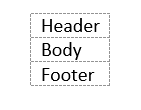
Unlike the flexibility of HTML parsers, the converter enforces the logical flow required by Open XML. Therefore, regardless of the order in which you input the <thead>, <tbody>, and <tfoot> tags, they will always be correctly ordered in the final document body (Header → Body → Footer).
<table>
    <tbody><tr><td>Body</td></tr><tbody>
    <thead><tr><td>Header</td></tr><thead>
    <tfoot><tr><td>Footer</td></tr><tfoot>
</table>