Prerequisites
- Create a new console application (.NET Core or .Net 6+ recommended).
- Add a reference this NuGet package
dotnet add package HtmlToOpenXml.
Step 1: Define the source HTML
const string htmlInput = @"
     <h1>Hello World!</h1>
     <p>This is the simplest example proving HtmlToOpenXml works.</p>";
Step 2: The conversion process
using DocumentFormat.OpenXml;
using DocumentFormat.OpenXml.Packaging;
using HtmlToOpenXml;
...

// 1. Create an in-memory stream to hold the resulting DOCX package data.
using (var generatedDocumentStream = new MemoryStream())
{
     // Initialize the DOCX package structure. This must happen before conversion.
     using (WordprocessingDocument package = WordprocessingDocument.Create(generatedDocumentStream, WordprocessingDocumentType.Document))
     {
          MainDocumentPart mainPart = package.MainDocumentPart;

          // Ensure the body is ready to receive content (optional, but robust).
          if (mainPart?.Document == null)
          {
               mainPart = package.AddMainDocumentPart();
               new Document(new Body()).Save(mainPart);
          }

          // Initialize the Converter, binding it to the target document part.
          HtmlConverter converter = new HtmlConverter(mainPart);

          // Perform the conversion into the document body.
          await converter.ParseBody(htmlInput);
     }

     // The stream must be rewound before being written to a file.
     generatedDocumentStream.Seek(0, SeekOrigin.Begin);
     File.WriteAllBytes(outputFilename, generatedDocumentStream.ToArray());

     Console.WriteLine($"Conversion successful. Output saved to: {outputFilename}");
}
Store your input markup in a string or resource file. For this example, we will use the Properties.Resources. DemoHtml.html:
<!DOCTYPE html>
<html>
<head>
    <meta charset="UTF-8">
    <title>Report Title</title>
</head>
<body>
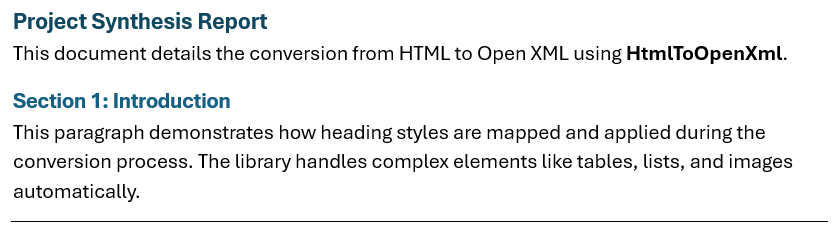
    <h1>Project Synthesis Report</h1>
    <p>This document details the conversion from HTML to Open XML using <b>HtmlToOpenXml</b>.</p>
    <h2>Section 1: Introduction</h2>
    <p>This paragraph demonstrates how heading styles are mapped and applied during the conversion process. The library handles complex elements like tables, lists, and images automatically.</p>
    <hr/>
</body>
</html>
Step 3: Visual generated output