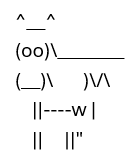
The <pre> tag preserves all source formatting (whitespace, indentation, and line breaks) into the final DOCX document. This feature guarantees that your input text—such as code snippets, logs, or ASCII art—retains its exact visual structure.
Controlling Output Structure
The RenderPreAsTable property determines how the preserved content is physically packaged within the Word document:
Default (
true): The content is placed inside a single-cell table. This is generally recommended when preserving complex arrangements or maintaining strict column alignments is desired.Disabled (
false): The content is placed inside a standard paragraph block. Use this when the simpler OpenXml structure is preferred, but you still need reliable line break and whitespace preservation.
// Default behavior (table embedding):
converter.RenderPreAsTable = true;

// Alternative structure (pure paragraph block):
converter.RenderPreAsTable = false;